
BlackVue DR900X Review (2026)
Overview – who this dash cam is for
The BlackVue DR900X is a high-end dash cam designed for drivers who want discreet, reliable front-and-rear recording with strong cloud features. It suits UK motorists who park on the street, drive frequently in busy areas, or simply want a “fit and forget” system that quietly documents every journey.
This model is particularly appealing if you care about a neat, low-profile installation and are comfortable using a smartphone to manage settings and view footage. It is less aimed at budget buyers and more at drivers willing to pay for a polished experience and long-term reliability.
Key features
-
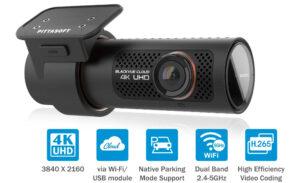
4K UHD front camera recording and Full HD rear camera.
-
Slim, cylindrical body with discreet all-black design and no built-in screen.
-
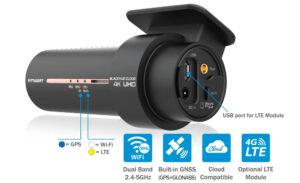
Built-in Wi‑Fi and GPS for app control, speed, and location data.
-
Cloud connectivity when paired with a data connection (e.g. hotspot or LTE module) for remote access and notifications.
-
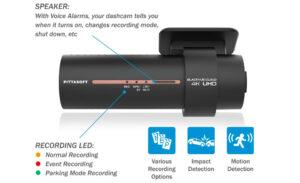
Parking mode with motion and impact detection, plus buffered recording before and after events.
-
Supercapacitor power design for better heat resistance and stability.
-
Voice notifications and status LED so you know when recording or if something is wrong.
-
Support for large microSD cards and efficient compression to store more hours of footage.
Video quality – daytime and night performance
In daylight, the DR900X produces sharp, detailed footage from the 4K front camera. Road signs, lane markings and number plates are generally easy to read at normal speeds, especially when conditions are dry and bright. The wide field of view captures multiple lanes and roadside detail, which is useful when incidents occur slightly off-centre.
The rear Full HD camera offers a clear record of what is happening behind, particularly valuable for rear-end collisions, tailgating and parking scrapes. While it does not match the sharpness of the 4K front unit, it provides enough clarity to show vehicle movements and often to identify plates at lower speeds.
At night, the DR900X remains one of the better performers, though the limitations of any small camera still apply. Street-lit urban roads are captured with decent contrast and relatively low noise, allowing vehicles and pedestrians to be seen clearly. In darker country lanes or heavy rain, plates can be harder to capture reliably, but overall performance remains strong for a compact, discreet system.
Ease of installation
The DR900X’s slim, screenless tube design makes it easier to hide behind or close to the rear-view mirror, which is ideal for UK cars where windscreen obstruction rules apply. The front unit sticks to the glass with an adhesive mount, and once positioned, it largely disappears from the driver’s view.
Power can be taken from the 12V socket using an accessory cable, with routing along the headliner and down the passenger-side A‑pillar much like any other dash cam. For full-time parking mode and the neatest finish, many owners choose to use a dedicated hardwire kit connected to the fuse box. This keeps cables hidden and lets the camera monitor the car when parked, with voltage cut-offs to protect the battery.
The rear camera is connected by a coaxial cable that runs from the front to the back of the car. Routing this along roof linings, down pillars and through tailgate grommets takes a bit of patience, particularly on hatchbacks and estate cars. Because of the price and complexity, a good number of UK drivers choose professional fitting, resulting in a very clean installation that rarely needs to be touched afterward.
Pros and cons
Pros
-
Excellent 4K front recording and solid rear Full HD coverage provide detailed evidence.
-
Very discreet cylindrical design that hides well behind the mirror and looks factory-fit.
-
Reliable parking mode with buffered clips before and after an event, not just after the impact.
-
Cloud connectivity allows remote viewing and alerts if you provide a data connection.
-
App-based control is flexible once set up, with access to clips, settings and firmware updates.
-
Supercapacitor design and compact form cope well with heat and constant use.
Cons
-
No built-in screen means all framing and playback rely on the app, which some users may find less intuitive.
-
Cloud features depend on having a hotspot or dedicated data solution in the car, which adds cost and complexity.
-
Installation, especially rear camera and hardwiring, is more involved than basic single-channel models.
-
App connection and initial setup can feel technical for less confident users.
-
Higher overall cost compared with mid-range options that still offer dual-channel recording.
Who should buy it
The BlackVue DR900X is best suited to drivers who value a clean, discreet installation and strong long-term reliability, and who are comfortable using a smartphone to manage their dash cam. It works particularly well for people who park in public streets, shared car parks or high-risk areas and want robust parking surveillance.
It is a sensible choice for company car drivers, private hire and chauffeur services, and motorists who spend a lot of time on motorways and busy urban roads. Those who want to make use of cloud features, such as checking on their car from afar or receiving alerts if something happens, will benefit most from its connectivity.
By contrast, it may be less appropriate for drivers who prefer a simple, screen-based camera with minimal setup, or for those who are not interested in cloud functions and mainly want basic accident recording at a lower cost.
The BlackVue DR900X remains a strong premium option for UK drivers in 2026, combining high-quality front-and-rear recording with a discreet design and capable parking mode. While installation and setup are more involved than with simpler models, the end result is a tidy, always-on system that offers comprehensive coverage for everyday driving and parking on British roads.
If you’re unsure how to install a dash cam, see our step-by-step dash cam installation guide.